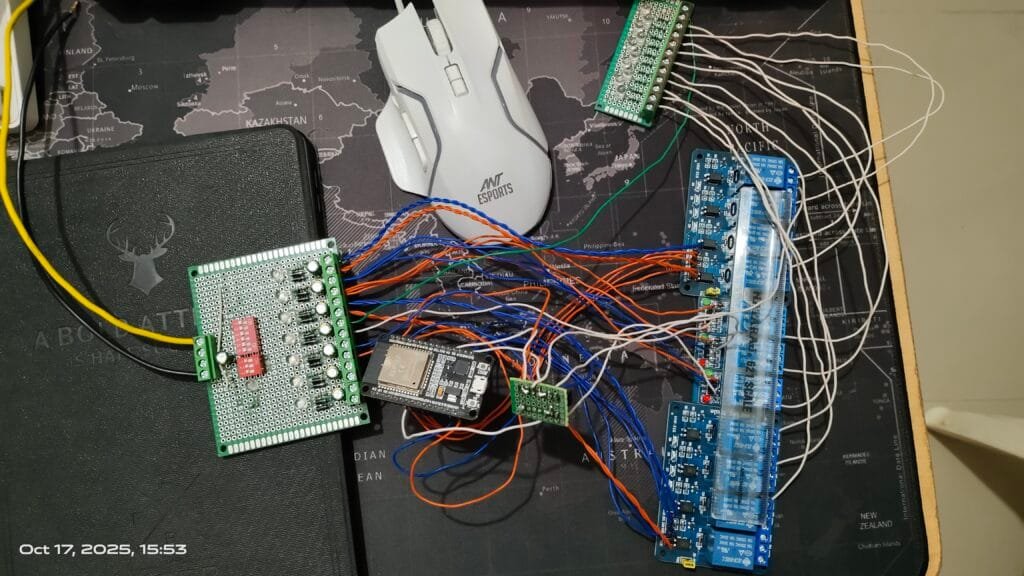

Want to make your home lighting smart this Diwali? Let’s create a Wi-Fi-based Diwali Light Controller using an ESP32, 11 relays, and a built-in web dashboard — no internet or router required!
With this project:
- You can connect your phone directly to the ESP32 hotspot.
- Open a web page and control all lights in real-time.
- Create and run your own lighting patterns (blink, ping-pong, alternate, etc.).
- Run default animations or even loop them continuously.
Project Overview
The ESP32 creates a local Wi-Fi Access Point (AP) named DiwaliLights with password 12345678.
When you connect your phone/laptop to this network and open the IP (usually 192.168.4.1), you’ll see a web interface with buttons for each relay, pattern creation options, and default lighting modes.
Each relay controls one light channel — so you can connect up to 11 different light strings or lamps.
Hardware Connections
| ESP32 Pin | Relay Channel | Description |
|---|---|---|
| GPIO23 | Relay 1 | Controls 1st light |
| GPIO22 | Relay 2 | Controls 2nd light |
| GPIO21 | Relay 3 | Controls 3rd light |
| GPIO19 | Relay 4 | Controls 4th light |
| GPIO18 | Relay 5 | Controls 5th light |
| GPIO4 | Relay 6 | Controls 6th light |
| GPIO32 | Relay 7 | Controls 7th light |
| GPIO33 | Relay 8 | Controls 8th light |
| GPIO25 | Relay 9 | Controls 9th light |
| GPIO26 | Relay 10 | Controls 10th light |
| GPIO27 | Relay 11 | Controls 11th light |
Relay VCC → 5V
Relay GND → ESP32 GND
Relay IN pins → GPIO pins as above
Use active HIGH relays for this code (the relays turn ON when the signal pin is HIGH). If you use active LOW modules, you can set activeLowRelays[i] = true for those channels.
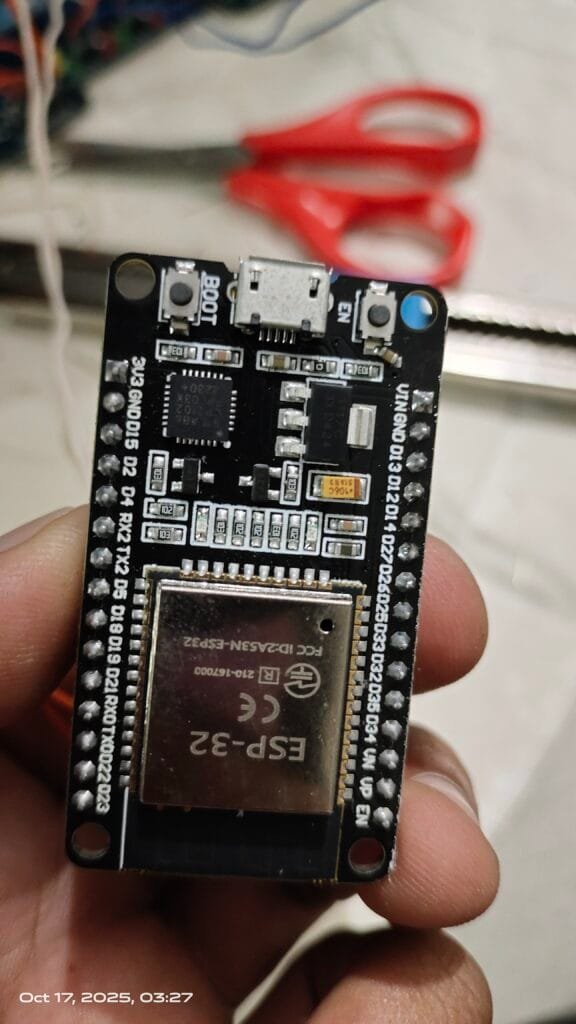
Libraries Used
#include <WiFi.h>
#include <WebServer.h>
- WiFi.h → for Wi-Fi configuration and creating Access Point.
- WebServer.h → for hosting a simple HTTP web server that handles page requests and relay commands.
🌐 Setting Up Wi-Fi Access Point
const char* ssid = "DiwaliLights";
const char* password = "12345678";

WiFi.mode(WIFI_AP);
WiFi.softAP(ssid, password);
This code puts ESP32 in Access Point mode — it broadcasts a Wi-Fi network that others can join.
After setup, it prints the IP (usually 192.168.4.1):
Serial.println(WiFi.softAPIP());
Relay Setup
int relays[] = {23, 22, 21, 19, 18, 4, 32, 33, 25, 26, 27};
int totalRelays = 11;
In setup(), each pin is configured as output:
for (int i=0;i<totalRelays;i++) {
  pinMode(relays[i], OUTPUT);
  setRelay(i+1,false);
}
The helper function setRelay() safely turns ON/OFF any relay:
void setRelay(int id, bool state) {
  if (activeLowRelays[id-1]) state = !state;
  digitalWrite(relays[id-1], state ? HIGH : LOW);
  relayStates[id-1] = state;
}
💻 The Web Dashboard (HTML + JS)
The HTML is embedded directly inside the Arduino sketch using:
String htmlPage = R"rawliteral( ... )rawliteral";
This page provides:
- Buttons for each relay
- “All ON” / “All OFF”
- Pattern creation inputs
- Default pattern selector
- Live relay status updates (every 1s)
Example relay buttons:
<button class='relay-btn off' id='r1' onclick='toggleRelay(1)'>Relay 1</button>
JavaScript functions like toggleRelay() and updateRelayStates() communicate with the ESP32’s web server using fetch() calls.
Example:
function toggleRelay(id) {
  fetch(`/toggle?relay=${id}`).then(()=>updateRelayStates());
}
This means every time you click a relay, your browser calls /toggle?relay=3, and the ESP32 toggles that relay instantly.
Custom Pattern System
Users can create custom lighting patterns via the dashboard.
Pattern Structure:
struct Pattern {
  int relay;
  unsigned long delayTime;
  unsigned long duration;
  int priority;
  bool state;
  bool running;
  unsigned long startTime;
};
Each pattern defines:
- Which relay to use
- Delay before start
- How long to stay ON
- Priority (order of execution)
- ON/OFF state
Patterns are stored in:
Pattern userPatterns[30];
int patternCount = 0;
⚙️ Web Endpoints (Handlers)
ESP32’s web server has many handlers like:
| URL | Function | Description |
|---|---|---|
/ | handleRoot() | Serves the dashboard HTML |
/toggle?relay=x | handleToggle() | Toggles relay x |
/status | handleStatus() | Returns relay states as JSON |
/addPattern | handleAddPattern() | Adds a new pattern |
/listPattern | handleListPattern() | Displays all added patterns |
/deletePattern | handleDeletePattern() | Removes a pattern |
/runPattern | handleRunPattern() | Executes custom user patterns |
/stopPattern | handleStopPattern() | Stops everything |
/runDefault | handleRunDefault() | Runs one default pattern |
/loopDefault | handleLoopDefault() | Loops a default pattern continuously |
/allOn, /allOff | Turns all relays ON/OFF |
Default Lighting Patterns
Four default animations are built-in:
1. Ping Pong
Lights move forward then backward one by one.
for (int i=1;i<=totalRelays;i++){ setRelay(i,true); delay(100); setRelay(i,false);}
for (int i=totalRelays;i>=1;i--){ setRelay(i,true); delay(100); setRelay(i,false);}
2. Series Hold Both Directions
All lights turn ON one by one, stay ON, then turn OFF backward.
for (int i=1;i<=totalRelays;i++){ setRelay(i,true); delay(150);}
delay(200);
for (int i=totalRelays;i>=1;i--){ setRelay(i,false); delay(150);}
3. Alternate ON with Hold
Even and odd relays blink alternately.
for (int i=1;i<=totalRelays;i+=2) setRelay(i,true);
delay(400);
for (int i=1;i<=totalRelays;i++) setRelay(i,false);
for (int i=2;i<=totalRelays;i+=2) setRelay(i,true);
delay(400);
for (int i=1;i<=totalRelays;i++) setRelay(i,false);
4. Blink All Every 3 Seconds
All lights blink together.
for (int i=1;i<=totalRelays;i++) setRelay(i,true);
delay(1500);
for (int i=1;i<=totalRelays;i++) setRelay(i,false);
delay(1500);
🔁 The Main Loop
void loop() {
  server.handleClient();  // Handle all web requests

  // Repeat selected default pattern if looping is ON
  if (loopMode && currentDefaultPattern != "") {
    runDefaultPattern(currentDefaultPattern);
  }

  // Execute custom user patterns
  if (runPattern) {
    unsigned long now = millis();
    for (int i=0;i<patternCount;i++) {
      if (userPatterns[i].running && now >= userPatterns[i].startTime) {
        setRelay(userPatterns[i].relay, userPatterns[i].state);
        if (now >= userPatterns[i].startTime + userPatterns[i].duration) {
          setRelay(userPatterns[i].relay, false);
          userPatterns[i].running = false;
        }
      }
    }
  }
}
The ESP32 continuously:
- Responds to web commands
- Runs user-defined timing-based patterns
- Optionally loops default ones
Using the Controller
- Power on the ESP32.
- Connect your phone to Wi-Fi “DiwaliLights” (password: 12345678).
- Open browser → http://192.168.4.1/
- Use buttons to:
- Toggle relays individually.
- Turn all ON/OFF.
- Create your own patterns.
- Run or loop default effects.
Everything updates in real time — no app or router required.
Final Thoughts
This ESP32 project is a powerful example of how a microcontroller + web server can create a smart IoT system without internet.
You can modify it to:
- Control more relays (16-channel boards work too).
- Add brightness control using PWM.
- Save user patterns in EEPROM.
- Add login/password protection to the web UI.
here is full code:
#include <WiFi.h>
#include <WebServer.h>

const char* ssid = "DiwaliLights";
const char* password = "12345678";

WebServer server(80);

// === RELAY PINS ===
int relays[] = {23, 22, 21, 19, 18, 4, 32, 33, 25, 26, 27};
int totalRelays = 11;

// === ACTIVE LOW RELAYS ===
bool activeLowRelays[11] = {false,false,false,false,false,false,false,false,false,false,false};

// === PATTERNS ===
struct Pattern {
  int relay;
  unsigned long delayTime;
  unsigned long duration;
  int priority;
  bool state;
  bool running;
  unsigned long startTime;
};
Pattern userPatterns[30];
int patternCount = 0;
bool runPattern = false;
bool loopMode = false;
String currentDefaultPattern = "";

// === RELAY STATES ===
bool relayStates[11] = {0};

// === HTML PAGE ===
String htmlPage = R"rawliteral(
<!DOCTYPE html>
<html>
<head>
<title>Diwali Light Controller</title>
<meta name="viewport" content="width=device-width, initial-scale=1">
<style>
  body { font-family: Arial; background:#111; color:#fff; text-align:center; }
  .relay-btn { padding:12px 20px; margin:5px; border:none; border-radius:8px; font-size:18px; }
  .on { background:lime; color:black; }
  .off { background:#444; color:white; }
  input, select { width:80px; margin:3px; }
  .pattern-box { background:#222; padding:10px; margin:10px; border-radius:8px; }
  button { cursor:pointer; margin:2px; }
</style>
</head>
<body>
<h2>Diwali Light Controller</h2>

<div id="relayControls"></div>
<br>
<button onclick="allOn()">All ON</button>
<button onclick="allOff()">All OFF</button>
<hr>

<h3>Create Pattern</h3>
Relay: <input id="relay" type="number" min="1" max="11">
Delay(ms): <input id="delay" type="number">
Duration(ms): <input id="duration" type="number">
Priority: <input id="priority" type="number" min="1" max="10">
State: <select id="state"><option value="1">ON</option><option value="0">OFF</option></select>
<button onclick="addPattern()">Add</button>
<div id="patternList"></div>

<hr>
<h3>Default Patterns</h3>
<select id="patternSelect">
  <option value="pingpong">Ping Pong</option>
  <option value="series">Series Hold Both Directions</option>
  <option value="alternate">Alternate ON with Hold</option>
  <option value="blink">Blink All Every 3s</option>
</select>
<button onclick="runSelected()">Run Once</button>
<button onclick="loopSelected()">Loop</button>
<hr>

<button onclick="runPattern()">Run Custom Patterns</button>
<button onclick="stopPattern()">Stop</button>

<script>
let relays = 11;

function loadRelays() {
  let html = "";
  for (let i=1;i<=relays;i++) {
    html += <button class='relay-btn off' id='r${i}' onclick='toggleRelay(${i})'>Relay ${i}</button>;
  }
  document.getElementById("relayControls").innerHTML = html;
}

function updateRelayStates() {
  fetch("/status").then(r=>r.json()).then(data=>{
    for (let i=1;i<=relays;i++) {
      let btn = document.getElementById("r"+i);
      btn.className = "relay-btn " + (data[i-1]==1?"on":"off");
    }
  });
}

function toggleRelay(id) {
  fetch(/toggle?relay=${id}).then(()=>updateRelayStates());
}

function allOn() { fetch("/allOn").then(()=>updateRelayStates()); }
function allOff() { fetch("/allOff").then(()=>updateRelayStates()); }

function addPattern() {
  let r = document.getElementById("relay").value;
  let d = document.getElementById("delay").value;
  let dur = document.getElementById("duration").value;
  let p = document.getElementById("priority").value;
  let s = document.getElementById("state").value;
  fetch(/addPattern?r=${r}&d=${d}&dur=${dur}&p=${p}&s=${s}).then(()=>showPattern());
}

function deletePattern(index) {
  fetch(/deletePattern?i=${index}).then(()=>showPattern());
}

function showPattern() {
  fetch("/listPattern").then(r=>r.text()).then(t=>{
    document.getElementById("patternList").innerHTML = t;
  });
}

function runPattern() { fetch("/runPattern"); }
function stopPattern() { fetch("/stopPattern"); }
function runSelected() {
  let pattern = document.getElementById("patternSelect").value;
  fetch(/runDefault?name=${pattern});
}
function loopSelected() {
  let pattern = document.getElementById("patternSelect").value;
  fetch(/loopDefault?name=${pattern});
}

setInterval(updateRelayStates, 1000); // Realtime update every 1s
loadRelays();
showPattern();
updateRelayStates();
</script>
</body></html>
)rawliteral";

// === RELAY CONTROL ===
void setRelay(int id, bool state) {
  if (id < 1 || id > totalRelays) return;
  if (activeLowRelays[id-1]) state = !state;
  digitalWrite(relays[id-1], state ? HIGH : LOW);
  relayStates[id-1] = state;
}

// === SORT PATTERNS ===
void sortPatterns() {
  for (int i=0;i<patternCount-1;i++) {
    for (int j=i+1;j<patternCount;j++) {
      if (userPatterns[i].priority > userPatterns[j].priority) {
        Pattern tmp = userPatterns[i];
        userPatterns[i] = userPatterns[j];
        userPatterns[j] = tmp;
      }
    }
  }
}

// === HANDLERS ===
void handleRoot() { server.send(200, "text/html", htmlPage); }

void handleStatus() {
  String json = "[";
  for (int i=0;i<totalRelays;i++) {
    json += String(relayStates[i]) + (i<totalRelays-1?",":"");
  }
  json += "]";
  server.send(200, "application/json", json);
}

void handleToggle() {
  int id = server.arg("relay").toInt();
  relayStates[id-1] = !relayStates[id-1];
  setRelay(id, relayStates[id-1]);
  server.send(200, "text/plain", "OK");
}

void handleAllOn() {
  for (int i=1;i<=totalRelays;i++) setRelay(i,true);
  server.send(200, "text/plain", "All ON");
}

void handleAllOff() {
  for (int i=1;i<=totalRelays;i++) setRelay(i,false);
  server.send(200, "text/plain", "All OFF");
}

void handleAddPattern() {
  if (patternCount < 30) {
    userPatterns[patternCount].relay = server.arg("r").toInt();
    userPatterns[patternCount].delayTime = server.arg("d").toInt();
    userPatterns[patternCount].duration = server.arg("dur").toInt();
    userPatterns[patternCount].priority = server.arg("p").toInt();
    userPatterns[patternCount].state = server.arg("s").toInt();
    userPatterns[patternCount].running = false;
    userPatterns[patternCount].startTime = 0;
    patternCount++;
    sortPatterns();
  }
  server.send(200, "text/plain", "Pattern Added");
}

void handleListPattern() {
  String txt = "";
  for (int i=0;i<patternCount;i++) {
    txt += "<div class='pattern-box'>#" + String(i+1) +
           " → R" + String(userPatterns[i].relay) +
           " | Delay:" + String(userPatterns[i].delayTime) +
           " | Duration:" + String(userPatterns[i].duration) +
           " | Priority:" + String(userPatterns[i].priority) +
           " | State:" + (userPatterns[i].state ? "ON" : "OFF") +
           " <button onclick='deletePattern("+String(i)+")'>Delete</button></div>";
  }
  server.send(200, "text/html", txt);
}

void handleDeletePattern() {
  int i = server.arg("i").toInt();
  if (i>=0 && i<patternCount) {
    for (int j=i;j<patternCount-1;j++) {
      userPatterns[j] = userPatterns[j+1];
    }
    patternCount--;
  }
  server.send(200, "text/plain", "Deleted");
}

void handleRunPattern() {
  runPattern = true;
  unsigned long now = millis();
  for (int i=0;i<patternCount;i++) {
    userPatterns[i].startTime = now + userPatterns[i].delayTime;
    userPatterns[i].running = true;
  }
  server.send(200, "text/plain", "Running Pattern");
}

void handleStopPattern() {
  runPattern = false;
  loopMode = false;
  currentDefaultPattern = "";
  for (int i=1;i<=totalRelays;i++) setRelay(i,false);
  server.send(200, "text/plain", "Stopped");
}

// === DEFAULT PATTERNS ===
void runDefaultPattern(String name) {
  if (name == "pingpong") {
    for (int i=1;i<=totalRelays;i++){ setRelay(i,true); delay(100); setRelay(i,false);}
    for (int i=totalRelays;i>=1;i--){ setRelay(i,true); delay(100); setRelay(i,false);}
  }
  else if (name == "series") {
    for (int i=1;i<=totalRelays;i++){ setRelay(i,true); delay(150);}
    delay(200);
    for (int i=totalRelays;i>=1;i--){ setRelay(i,false); delay(150);}
  }
  else if (name == "alternate") {
    for (int i=1;i<=totalRelays;i+=2) setRelay(i,true);
    delay(400);
    for (int i=1;i<=totalRelays;i++) setRelay(i,false);
    for (int i=2;i<=totalRelays;i+=2) setRelay(i,true);
    delay(400);
    for (int i=1;i<=totalRelays;i++) setRelay(i,false);
  }
  else if (name == "blink") {
    for (int i=1;i<=totalRelays;i++) setRelay(i,true);
    delay(1500);
    for (int i=1;i<=totalRelays;i++) setRelay(i,false);
    delay(1500);
  }
}

void handleRunDefault() {
  String pattern = server.arg("name");
  loopMode = false;
  currentDefaultPattern = pattern;
  runDefaultPattern(pattern);
  server.send(200, "text/plain", "Running " + pattern);
}

void handleLoopDefault() {
  String pattern = server.arg("name");
  loopMode = true;
  currentDefaultPattern = pattern;
  server.send(200, "text/plain", "Looping " + pattern);
}

// === SETUP ===
void setup() {
  Serial.begin(115200);
  for (int i=0;i<totalRelays;i++) {
    pinMode(relays[i], OUTPUT);
    setRelay(i+1,false);
  }

  WiFi.mode(WIFI_AP);
  WiFi.softAP(ssid, password);
  delay(100);
  Serial.println("AP Started: " + String(ssid));
  Serial.print("IP: "); Serial.println(WiFi.softAPIP());

  server.on("/", handleRoot);
  server.on("/status", handleStatus);
  server.on("/toggle", handleToggle);
  server.on("/addPattern", handleAddPattern);
  server.on("/listPattern", handleListPattern);
  server.on("/deletePattern", handleDeletePattern);
  server.on("/runPattern", handleRunPattern);
  server.on("/stopPattern", handleStopPattern);
  server.on("/runDefault", handleRunDefault);
  server.on("/loopDefault", handleLoopDefault);
  server.on("/allOn", handleAllOn);
  server.on("/allOff", handleAllOff);

  server.begin();
  Serial.println("Web Server started");
}

// === LOOP ===
void loop() {
  server.handleClient();

  if (loopMode && currentDefaultPattern != "") {
    runDefaultPattern(currentDefaultPattern);
  }

  if (!runPattern) return;

  unsigned long now = millis();
  for (int i=0;i<patternCount;i++) {
    if (userPatterns[i].running && now >= userPatterns[i].startTime) {
      setRelay(userPatterns[i].relay, userPatterns[i].state);
      if (now >= userPatterns[i].startTime + userPatterns[i].duration) {
        setRelay(userPatterns[i].relay, false);
        userPatterns[i].running = false;
      }
    }
  }
}