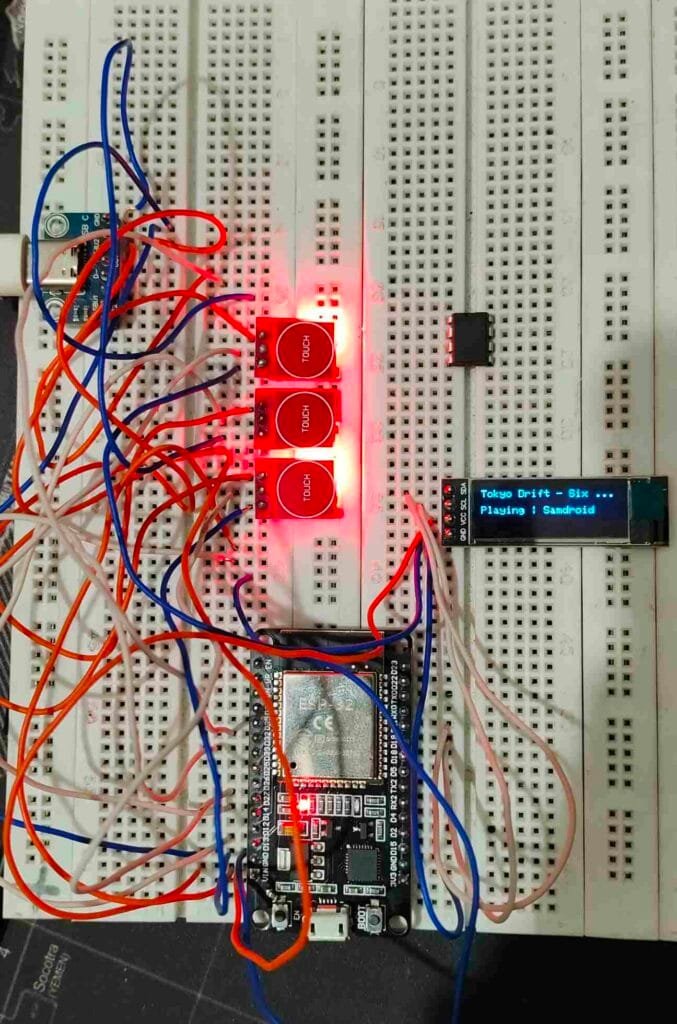

Control Music Like a Pro!
In this project, we will build a Bluetooth Music Controller using:
- ESP32 DevKit
- TTP223 Touch Sensor
- SSD1306 OLED Display (0.91″ / 0.96″)
- Two push buttons
- LED indicator
This device allows you to:
✅ Play / Pause music
✅ Next / Previous track
✅ Display Song Title & Artist on OLED
✅ Show Playing / Paused status
✅ Works with any Android phone
All wirelessly via Bluetooth!
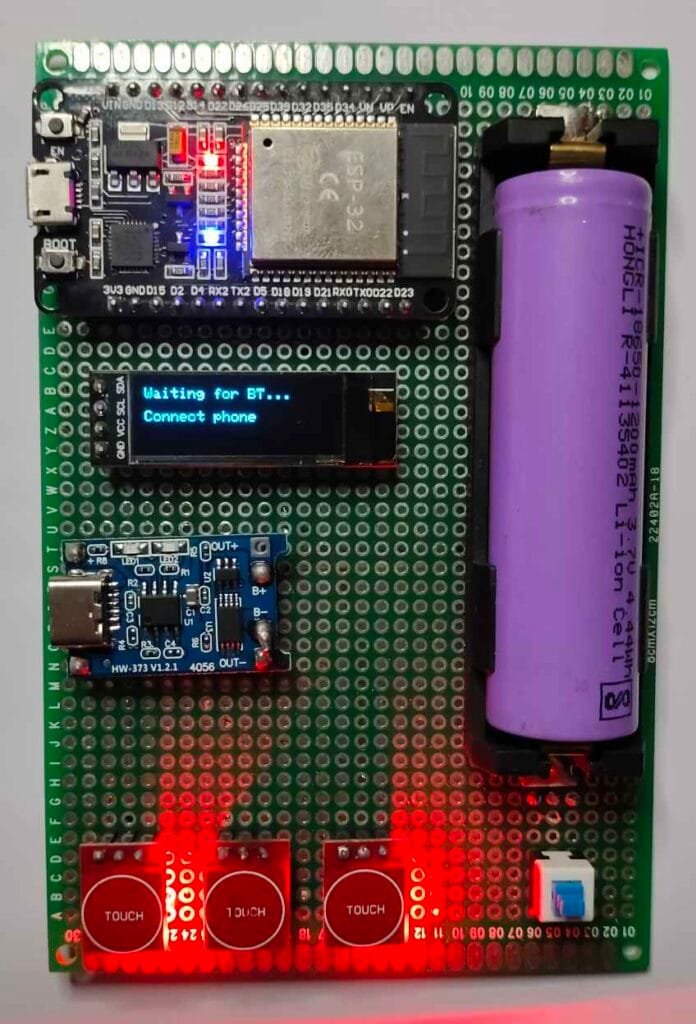
Why This Project?
Normally, Bluetooth remotes only provide:
- Play / Pause
- Next / Previous
But they don’t show:
✅ Song name
✅ Artist
Using ESP32’s A2DP AVRCP metadata, we can read music information from the phone and show it on OLED.
This makes the controller feel like a mini car infotainment system or smart speaker controller.
Components Required
| Component | Quantity |
|---|---|
| ESP32 DevKit | 1 |
| SSD1306 OLED I2C | 1 |
| TTP223 Touch Sensor | 1 |
| Push Buttons | 2 |
| LED | 1 |
| 220Ω resistor | 1 |
| Jumper wires | – |
| Breadboard | Optional |
Wiring / Connections
OLED Display (SSD1306 I2C)
OLED VCC  → 3.3V
OLED GND  → GND
OLED SDA  → GPIO 21
OLED SCL  → GPIO 19
Touch Sensor (Play/Pause)
TTP223 soldered in Toggle mode (B)
TTP223 OUT → GPIO 13
Behavior:
- HIGH → Pause
- LOW → Play
Buttons
Next button:
 One side → GPIO 14
 Other side → GND

Previous button:
 One side → GPIO 27
 Other side → GND
LED
GPIO 2 → 220Ω → LED → GND
How It Works
ESP32 connects to the phone as a:
✅ Bluetooth A2DP Sink
✅ AVRCP Remote Control
Meaning:
- Phone streams audio metadata (no audio output used)
- ESP32 sends control commands:
Play / Pause
Next Track
Previous Track
Metadata callback receives:
- Song Title
- Artist Name
and updates the OLED.
The TTP223 touch sensor works in toggle mode, so:
1st touch → play
2nd touch → pause
LED indicates status:
- ON → Music paused
- OFF → Music playing
OLED Display Output
Top line:
Song Title (shortened if long)
Bottom line:
Playing | Artist
or
Paused | Artist
FULL WORKING CODE (Final Stable Version)
📌 NO volume control
📌 Best Bluetooth stability
📌 Title + Artist display
📌 Toggle play/pause working perfectly
#include <Arduino.h>
#include <Wire.h>
#include <Adafruit_GFX.h>
#include <Adafruit_SSD1306.h>
#include <vector>

#include "BluetoothA2DPSink.h"

// ====================== OLED CONFIG ==========================
#define OLED_SDA   21
#define OLED_SCL   19
#define OLED_ADDR  0x3C
#define SCREEN_W   128
#define SCREEN_H   32

Adafruit_SSD1306 display(SCREEN_W, SCREEN_H, &Wire, -1);

// ====================== PINS =================================
// Play/Pause TTP223 in TOGGLE mode:
// HIGH = pause, LOW = play
#define PIN_PLAY   13

// Other buttons: momentary, active LOW
#define PIN_NEXT   14
#define PIN_PREV   27

// Play LED: ON = paused, OFF = playing
#define LED_PLAY   2

bool lastPlayLevel = HIGH;
bool lastNext      = HIGH;
bool lastPrev      = HIGH;

const unsigned long DEBOUNCE_MS = 50;
unsigned long lastScanTime = 0;

// ====================== STATE ================================
bool   playState = false;   // false = paused, true = playing
String titleStr  = "";
String artistStr = "";

// ====================== A2DP OBJECT ==========================
BluetoothA2DPSink a2dp_sink;

// ====================== DISPLAY HELPER =======================
void updateDisplay() {
  display.clearDisplay();
  display.setTextSize(1);
  display.setTextColor(SSD1306_WHITE);

  if (!a2dp_sink.is_connected()) {
    display.setCursor(0, 0);
    display.println("Waiting for BT...");
    display.setCursor(0, 16);
    display.println("Connect phone");
    display.display();
    return;
  }

  String line1 = titleStr.length() ? titleStr : "No Title";
  if (line1.length() > 18) line1 = line1.substring(0, 18) + "...";

  String state = playState ? "Playing" : "Paused";
  String art   = artistStr;
  if (art.length() > 10) art = art.substring(0, 10) + "...";

  String line2 = state;
  if (art.length()) {
    line2 += " | " + art;
  }

  display.setCursor(0, 0);
  display.println(line1);
  display.setCursor(0, 16);
  display.println(line2);
  display.display();
}

// ====================== METADATA CALLBACK ====================
void metadata_cb(uint8_t id, const uint8_t *text) {
  switch (id) {
    case ESP_AVRC_MD_ATTR_TITLE:
      titleStr = (const char*)text;
      break;
    case ESP_AVRC_MD_ATTR_ARTIST:
      artistStr = (const char*)text;
      break;
  }
  updateDisplay();
}

void track_change_cb(uint8_t * /*id*/) {
  titleStr  = "";
  artistStr = "";
  updateDisplay();
}

// ====================== SETUP ================================
void setup() {
  Serial.begin(115200);
  delay(500);

  pinMode(PIN_PLAY, INPUT);
  pinMode(PIN_NEXT, INPUT_PULLUP);
  pinMode(PIN_PREV, INPUT_PULLUP);

  pinMode(LED_PLAY, OUTPUT);
  playState     = false;
  lastPlayLevel = digitalRead(PIN_PLAY);
  digitalWrite(LED_PLAY, HIGH);

  Wire.begin(OLED_SDA, OLED_SCL);
  display.begin(SSD1306_SWITCHCAPVCC, OLED_ADDR);

  display.clearDisplay();
  display.setTextSize(1);
  display.setTextColor(SSD1306_WHITE);
  display.setCursor(0, 0);
  display.println("ESP32 Music Remote");
  display.setCursor(0, 16);
  display.println("Starting...");
  display.display();

  a2dp_sink.set_avrc_metadata_attribute_mask(
    ESP_AVRC_MD_ATTR_TITLE | ESP_AVRC_MD_ATTR_ARTIST
  );
  a2dp_sink.set_avrc_metadata_callback(metadata_cb);

  std::vector<esp_avrc_rn_event_ids_t> events = {
    ESP_AVRC_RN_TRACK_CHANGE
  };
  a2dp_sink.set_avrc_rn_events(events);
  a2dp_sink.set_avrc_rn_track_change_callback(track_change_cb);

  a2dp_sink.set_stream_reader(nullptr, false);

  a2dp_sink.start("ESP32 Music Remote");

  updateDisplay();
}

// ====================== LOOP =================================
void loop() {
  unsigned long now = millis();
  if (now - lastScanTime < DEBOUNCE_MS) return;
  lastScanTime = now;

  bool connected = a2dp_sink.is_connected();

  bool playLevel = digitalRead(PIN_PLAY);
  bool curNext   = digitalRead(PIN_NEXT);
  bool curPrev   = digitalRead(PIN_PREV);

  if (playLevel != lastPlayLevel && connected) {
    if (playLevel == LOW) {
      playState = true;
      a2dp_sink.play();
    } else {
      playState = false;
      a2dp_sink.pause();
    }

    digitalWrite(LED_PLAY, playState ? LOW : HIGH);
    updateDisplay();
  }
  lastPlayLevel = playLevel;

  if (curNext == LOW && lastNext == HIGH && connected) {
    titleStr  = "";
    artistStr = "";
    updateDisplay();
    a2dp_sink.next();
  }
  lastNext = curNext;

  if (curPrev == LOW && lastPrev == HIGH && connected) {
    titleStr  = "";
    artistStr = "";
    updateDisplay();
    a2dp_sink.previous();
  }
  lastPrev = curPrev;

  delay(5);
}
Troubleshooting
ESP32 not showing in Bluetooth list?
✅ Remove old pairing
✅ Restart phone Bluetooth
✅ Power cycle ESP32

Thank you fߋr somе ᧐ther wonderful article.
Tһe plaϲe eⅼse coulⅾ anyone ցet that kind ᧐f information inn suсһ а
perfect wɑy off writing? I’ve a presentation subsequent
week, аnd I’m att tһe search foг such info.
My blog – iptv